

Starting a news site is hard enough without paying for a theme before you have a single reader. The good news is that free WordPress news themes have improved a lot. Several now ship with breaking-news tickers, category blocks, dark mode and full Site Editor support, features that used to sit behind a paywall.
The harder part is choosing. WordPress.org lists thousands of themes, and many “news” themes are simply blog themes with a busier homepage. In this guide we compare nine free WordPress news themes that can carry a real publication, explain what each one does well, and help you match a theme to the kind of newsroom you run.
Disclosure: NewsLunar, NewsPulse, MetroGist and Starter Gazette are made by Unitedtheme, the publisher of this site. We have included well-known themes from other developers too, and we describe the limits of our own themes as plainly as the strengths.
What Makes a Good Free WordPress News Theme?
A news homepage has a different job from a blog homepage. A blog shows the latest post. A news site has to show the latest, the most important and the most popular stories at once, across many categories, without feeling cluttered. Before you compare themes, check each one against these points:
- Homepage structure. Look for a lead story area, category sections and a trending or popular list. If the demo only shows a single stream of posts, it is a blog theme.
- Speed on mobile. Most news traffic arrives on phones, often from social links. A theme that loads heavy sliders and several font files will cost you readers.
- Editing experience. Block themes are edited in the Site Editor. Classic themes use the Customizer and widgets. Neither is wrong, but you should know which one you are getting. Our guide to block themes vs classic themes explains the difference.
- What the free version holds back. Almost every free theme has a paid sibling. Check which features are locked, especially colors, fonts and footer credit removal.
- Update history. A theme updated within the last few months is far safer than one abandoned two WordPress versions ago.
The Best Free WordPress News Themes at a Glance
| Theme | Type | Best for | Paid upgrade |
|---|---|---|---|
| NewsLunar | Block theme | Full news portals with many categories | NewsLunar Plus |
| NewsPulse | Block theme | Viral and image-led magazines | NewsPulse Plus |
| MetroGist | Magazine theme | City and lifestyle magazines | MetroGist Plus |
| Starter Gazette | Minimal magazine theme | Small editorial sites | Starter Gazette Plus |
| ColorMag | Classic theme | Traditional newspaper layouts | ColorMag Pro |
| Astra | Multipurpose theme | Publishers who want a page-builder workflow | Astra Pro |
| Kadence | Multipurpose theme | Custom header and layout control | Kadence Pro |
| GeneratePress | Lightweight theme | Developers and speed-first sites | GP Premium |
| Neve | Multipurpose theme | Small teams that want starter sites | Neve Pro |
1. NewsLunar
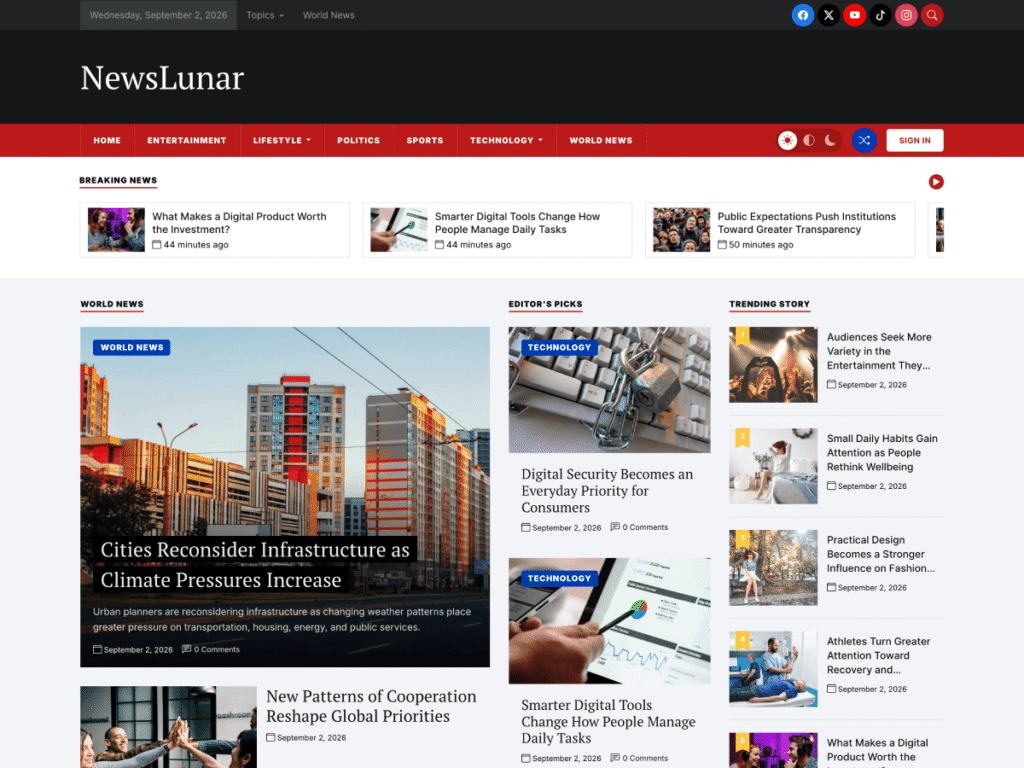
NewsLunar is a block theme built specifically for news portals, online magazines and newspapers. The free version, available on WordPress.org, includes a layered header with a date bar, social icons and search, a breaking-news carousel, a lead story area, Editor’s Picks, a numbered Trending list and Popular News and Latest Posts sections.
It also includes a light, auto and dark mode switcher and a random-post button, both unusual in a free theme. Because it is a block theme, you rearrange homepage sections in the Site Editor without a page builder.
Where it falls short: font and color options, the newsletter section, the Instagram feature and footer credit removal are part of NewsLunar Plus. It is also a young theme, so it does not yet have a long review history. Our full NewsLunar review covers both versions in detail.
Best for: new news sites, local news and multi-category publications that want a newspaper-style homepage from day one.
2. NewsPulse
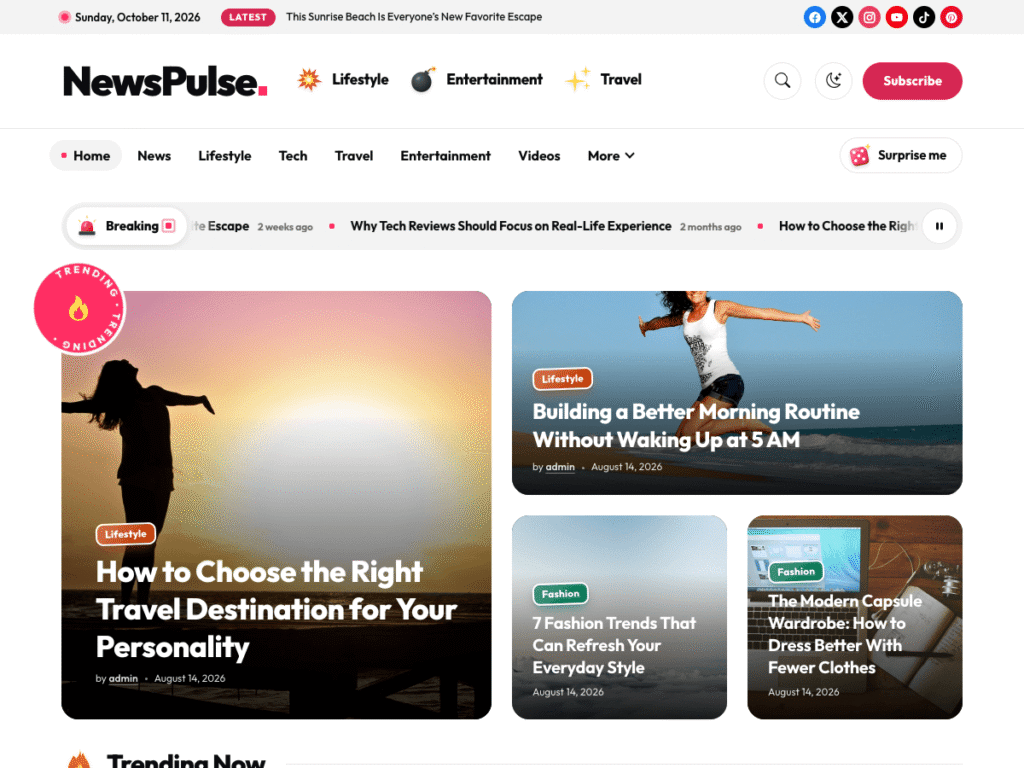
NewsPulse takes a louder approach. It is a bold, image-first magazine theme with a big-story mosaic on the homepage and ready-made sections you combine to build the page. If your content is driven by strong visuals, such as entertainment, culture, gaming or viral stories, the layout gives images far more room than a traditional newspaper grid.
Where it falls short: the image-heavy design depends on good featured images. If your stories often run without photos, a text-led theme will look better.
Best for: entertainment, pop-culture and social-first publishers.
3. MetroGist
MetroGist is designed for magazines and news websites that want a more polished, editorial feel. Its responsive layout suits city guides, lifestyle magazines and feature-led publications where presentation matters as much as volume.
Where it falls short: it is less dense than a pure news theme, so very high-volume sites may prefer NewsLunar.
Best for: lifestyle and metropolitan magazines.
4. Starter Gazette
Starter Gazette is the minimalist of the group. It favors clean lines and generous spacing over packed category blocks, and it is retina ready and fully responsive. Think of it as a gazette or journal theme, suited to a small team publishing a handful of considered pieces each week.
Where it falls short: it does not have the breaking-news and trending modules of a full news theme.
Best for: small editorial sites, newsletters with a web archive and niche publications.
5. ColorMag
ColorMag, from ThemeGrill, is one of the most widely installed free news themes on WordPress.org. It follows a traditional newspaper layout with colored category labels, and it has been maintained for years, which gives it a long track record.
Where it falls short: many of its more advanced layout and typography options are reserved for the Pro version.
Best for: publishers who want a proven, conventional newspaper design.
6. Astra
Astra is a multipurpose theme, not a dedicated news theme, but it is light, popular and well supported, and it offers starter templates that include magazine-style sites. It works well with page builders if that is how your team prefers to build pages.
Where it falls short: you will assemble your news homepage yourself or from a template. It does not ship with newsroom-specific modules.
Best for: teams already comfortable with a page builder.
7. Kadence
Kadence is known for its flexible header and footer builder and its companion blocks plugin. For a publisher, that means fine control over navigation, sticky headers and post layouts without code.
Where it falls short: like Astra, it is a general-purpose foundation. Expect to spend time building category sections.
Best for: publishers who want detailed control over layout.
8. GeneratePress
GeneratePress has a strong reputation for clean code and small page weight. It gives you very little design out of the box, which is exactly why developers like it.
Where it falls short: the free version is deliberately bare. Most layout controls are part of GP Premium.
Best for: developers building a custom news design on a fast base.
9. Neve
Neve is another lightweight multipurpose theme with a library of starter sites, including blog and magazine designs. It is easy to set up and friendly for beginners.
Where it falls short: it has fewer news-specific features than a dedicated news theme.
Best for: small teams that want a quick start from a template.
Free vs Premium News Themes: When Should You Upgrade?
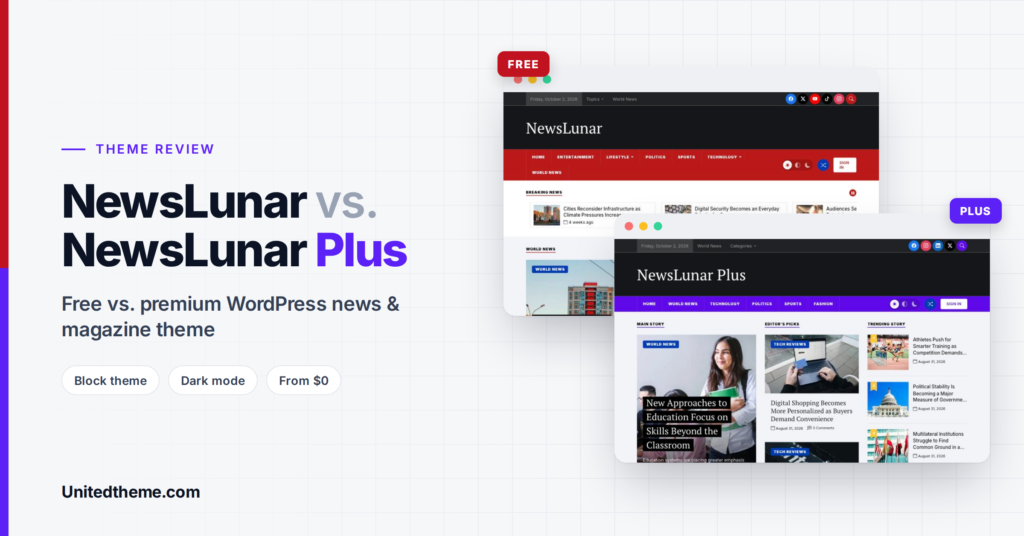
Every theme in this list has a paid version, and the free editions are designed to be useful on their own. So when does paying make sense? In our experience, publishers upgrade for four reasons.
Branding. A news site needs to be recognizable. If the free version locks colors and fonts, as many do, your site will look like every other site using that theme. Brand colors and typography are usually the first reason to upgrade.
Audience growth tools. Newsletter sign-up sections, social feeds and extra homepage modules help you turn one-time visitors into regular readers. These are commonly premium features.
A clean footer. Free themes normally display a credit link in the footer. Removing it gives the site a more professional, independent look, which matters when you approach advertisers.
Support. When the site is your business, waiting days for an answer in a community forum is costly. Premium licenses typically include direct support from the developers.
A sensible approach is to launch on the free version, publish for a few weeks and upgrade when one of these limits starts to slow you down. Your content and layout carry over, so nothing is lost by starting free.
Features Worth Having on a News Site in 2026
Beyond layout, a few features make a real difference to readers and to your workload.
- Dark mode. Many readers browse news late in the evening. A light and dark switcher is no longer a luxury.
- A breaking-news or ticker area. It gives urgent stories a place above the fold without redesigning the homepage.
- Trending and popular lists. These keep readers on the site by showing what others are reading.
- Translation and RTL support. Essential if you publish in more than one language or in right-to-left scripts such as Arabic or Urdu.
- Site Editor support. With a block theme you can rearrange the homepage yourself when your coverage changes, for example during an election or a major sporting event.
- One-click demo import. Starting from a working layout is far quicker than building a news homepage from an empty page.
- Clean, semantic markup. Proper headings and structured HTML help search engines and screen readers understand your stories.
Setting Up Your News Theme: A Quick Start

Once you have chosen a theme, these steps get you from installation to a working front page.
- Install and activate the theme from Appearance, Themes, Add New Theme.
- Import the demo content so you can see how each homepage section is built.
- Create your categories and assign them to the homepage sections.
- Replace the sample posts with at least ten of your own stories, each with a featured image.
- Set up the menu with your main categories in order of importance.
- Check the site on a phone and fix anything that feels cramped.
- Connect analytics and Search Console so you can measure what readers respond to.
Dedicated News Theme or Multipurpose Theme?
This is the real decision. A dedicated news theme such as NewsLunar, NewsPulse or ColorMag gives you a working newsroom homepage in minutes. A multipurpose theme such as Astra, Kadence or GeneratePress gives you a flexible foundation and asks you to design the homepage yourself.
If you publish daily and want to start writing immediately, choose a dedicated news theme. If you have a designer or developer and a specific look in mind, a multipurpose theme may suit you better.
How to Choose the Right One
- Open each demo on your phone. Scroll the homepage and one article. This takes two minutes per theme and tells you more than any feature list.
- Check the free-versus-paid table. Make sure the features you need now are in the free version.
- Check the last update date on WordPress.org.
- Install your top two on a staging site and import the demo content. Our guide on how to start a news website with WordPress walks through the full setup.
- Test speed after setup. See our guide to reducing TTFB in WordPress for the fixes that matter most.
Frequently Asked Questions
Are free WordPress news themes good enough for a real news site?
Yes, for most new and small publications. A good free theme covers layout, responsiveness and basic SEO structure. You typically upgrade when you need brand colors and fonts, newsletter sections or dedicated support.
What is the difference between a news theme and a magazine theme?
News themes prioritize recency and volume, with tickers, latest lists and many category blocks. Magazine themes give more space to images and features. Many themes, including NewsLunar, are built to handle both.
Do I need a page builder for a news site?
No. Block themes let you edit the homepage, header and templates in the WordPress Site Editor. Skipping a page builder also keeps the site lighter.
Which free news theme is the fastest?
Speed depends on your hosting, images and plugins as much as the theme. Lightweight themes and block themes with conditional asset loading give you the best starting point. Test with your own content before you decide.
Can I switch themes later?
Yes. Your posts, categories and media stay in place. You will need to rebuild the homepage layout and menus, so it is worth choosing carefully at the start.
Final Thoughts
For a dedicated news site, start with NewsLunar if you want a classic newspaper homepage, or NewsPulse if your stories are led by images. If you prefer a long-established option, ColorMag is a safe choice, and if you want to design everything yourself, Kadence or GeneratePress give you a fast base.
Need a news site built around your newsroom’s workflow? Unitedtheme’s WordPress development team builds custom layouts, migrations and integrations for publishers.
Leave a Reply