Overview
Almighty Plus is the complete version of Almighty
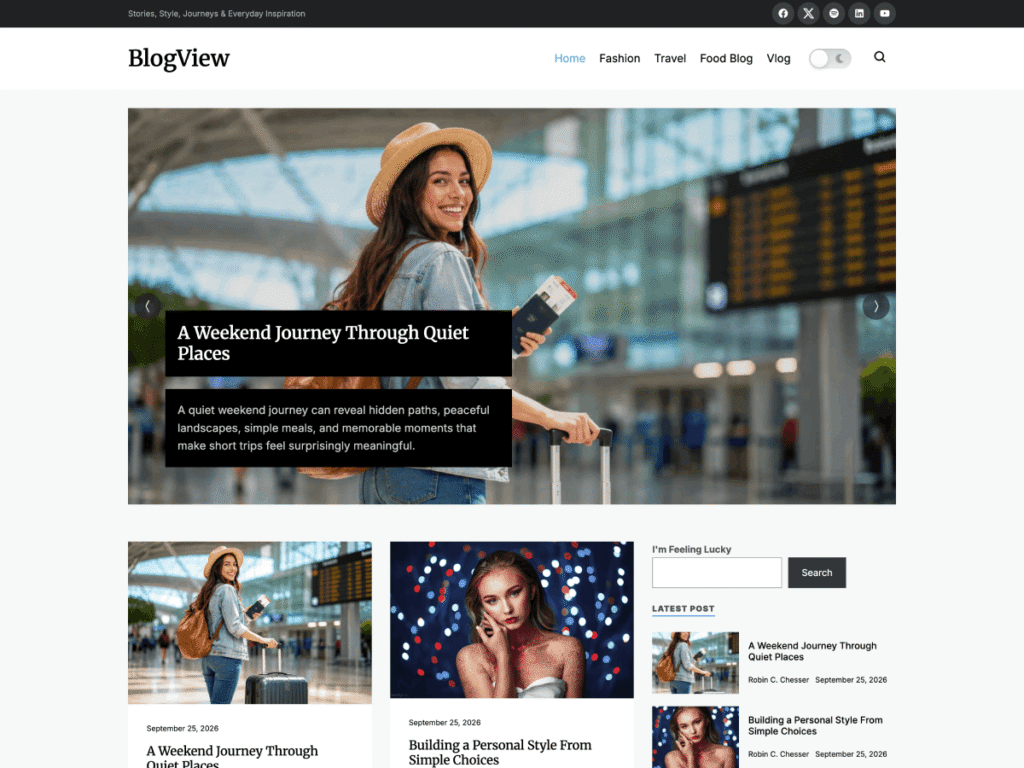
Almighty is a modern, clean blog theme for writers who like minimalism and clean lines, with a light or dark header, a homepage slider and a footer featured blog. Almighty Plus is its premium edition: the same design, plus full control over colors and type, a newsletter popup, Instagram and YouTube widgets and the touches readers notice on every post.
Almighty Plus is a full theme, not an add-on. Upload it, activate it in place of the free theme, and your posts, pages and menus are waiting for you.
- Posts, pages and menus carry over
- Same design, many more options
- Two demos to start from
What you get
Everything Almighty Plus adds
The free Almighty theme gives you a light or dark header, a homepage slider of up to nine slides, a footer featured blog, one accent color and two font choices. Almighty Plus adds everything below.
Full color and type controls
Go beyond one accent color: set text, heading, link, link hover, muted text, border and background colors, and the size, weight, line height and spacing of body, heading, site title and menu fonts. Fonts are served from your own site.
Updates and dedicated support
A license brings theme updates straight to your dashboard and puts your questions in front of the people who build Almighty Plus.
Newsletter popup
Invite readers to subscribe with a popup that holds an image, a short message and your Mailchimp form, shown on the homepage only or just once per visitor.
Instagram and YouTube widgets
Show a grid of your Instagram photos with a follow button, and embed a YouTube video with a link to your channel.
Open Graph and Twitter cards
Every post shares with a proper title, description and image, and you can change them on any post.
Site verification and scripts
Verify your site with Google, Bing, Pinterest and Yandex, and add analytics or other code to the header and footer, site-wide or on one post.
One-click setup
Start from the Default or Pro demo
Install One Click Demo Import, choose a demo and bring in its posts, widgets and Customizer settings in one go. Then swap the sample posts for your own and set the slider to the stories you want seen first.
- Default and Pro demos included
- Posts, widgets and settings imported together
- Recommended plugins suggested on activation
Built to be shared
Better previews on search and social
Open Graph and Twitter Summary Card tags give every post a clean preview when it is shared, and you can change the title, description and image post by post. Site verification links your blog to the major webmaster tools.
- Open Graph and Twitter Summary Card tags
- Google, Bing, Pinterest and Yandex verification
- Header and footer script fields for analytics
Reader tools
Small touches readers notice
Almighty Plus adds the details that make a minimal blog feel finished, and lets you switch the post extras off globally or on a single post.
Author box
Introduce the writer under every post with their photo, bio and website link.
Reading time
Show an estimated reading time so readers know what to expect before they start.
Share buttons
Readers can share to Facebook, X, Pinterest, LinkedIn, WhatsApp or email, or copy the link.
Per-post layout
Choose a left, right or no sidebar for any post or page, and hide the author box, reading time or share buttons on that post only.
Accessibility toolbar
Visitors can adjust content, colors and orientation, and you can publish an accessibility statement.
Your own footer
The theme credit is off by default, so the footer carries only your copyright line, and a full-width widget area sits just above it.
- Starting a new blog Install Almighty Plus, import the Default or Pro demo and start publishing the same day.
- Moving up from Almighty Activate Almighty Plus in place of the free theme. Posts, pages, categories and menus stay; set your logo, header and colors again or import a demo.
- Trying it first Run the free Almighty theme from WordPress.org for as long as you like, and open the live preview to see Almighty Plus before you buy.
01License
Buy Almighty Plus
Choose a license on this page and check out. The theme ZIP is ready to download straight away.
02Theme
Upload and activate
Appearance → Themes → Add New Theme → Upload Theme. Choose the ZIP and activate Almighty Plus.
03Demo
Import a demo
Install One Click Demo Import when prompted, then pick the Default or Pro demo.
04Brand
Make it yours
Open the Customizer to set your colors and fonts, the header scheme, the homepage slider and the newsletter popup.
Free or Plus
Almighty or Almighty Plus?
Free theme
Stay on the free theme if…
- One accent color and two fonts are enough for you.
- The slider, a sidebar and the footer featured blog are all you need.
- Community support on WordPress.org is enough.
Plus theme
Choose Almighty Plus when…
- You want full control over colors, font sizes and weights.
- You want a newsletter popup to grow your list.
- You want author boxes, reading time and share buttons on posts.
- You want better previews when posts are shared.
- You want updates and direct support from the developers.
Compare
Almighty vs Almighty Plus
Everything in the free theme is in Almighty Plus too. Here is what the Plus theme adds, taken from the theme files themselves.
| Feature | Almighty Free forever |
Almighty Plus From $49.00 |
|---|---|---|
| Design | ||
| Light or dark header scheme | Included | Included |
| Homepage slider and footer featured blog | Included | Included |
| Accent color and two font choices | Included | Included |
| Text, heading, link, border and background colors | Not included | Included |
| Font size, weight, line height and menu fonts | Not included | Included |
| Full-width footer widget area | Not included | Included |
| Remove the footer credit | Not included | Included |
| Readers | ||
| Author box, reading time and social share | Not included | Included |
| Per-post sidebar and display settings | Not included | Included |
| Hide the featured image on a single post | Included | Included |
| Newsletter popup (Mailchimp) | Not included | Included |
| Author Info, Recent Posts and Social Menu widgets | Included | Included |
| Instagram and YouTube widgets | Not included | Included |
| Accessibility toolbar | Not included | Included |
| Setup and SEO | ||
| One-click demo import (2 demos) | Not included | Included |
| Open Graph and Twitter cards | Not included | Included |
| Webmaster verification and custom scripts | Not included | Included |
| Translation ready and RTL | Included | Included |
| Support | ||
| Help | Community forum | Direct from the developers |
| Updates | WordPress.org | Included with your license |
Day 1
Import and identify
Import the Default or Pro demo, then add your logo, site title and menus, and pick a light or dark header.
Day 2
Colors and fonts
Set your accent, text and link colors, then the body and heading fonts with their size and weight. Check a post on your phone.
Day 3
Homepage slider
Choose the category or pages to feature, the number of slides, the button text and the slider colors.
Day 4
Grow your list
Install MailChimp for WordPress, add its form shortcode, an image and a short message to the popup, and choose when it appears.
Day 5
Widgets and sharing
Add the Instagram and YouTube widgets, then fill in Open Graph, Twitter card and site verification details.
Then
Publish
Write, share and let the author box, reading time and share buttons do the rest. Hide any of them on a single post from its settings box.
Product questions
Almighty Plus FAQ
Short answers about switching from the free theme and what your license includes.



Still have a question?
The people who build Almighty Plus answer every ticket, from setup to customization.
Is Almighty Plus a theme or a plugin?
Almighty Plus is a complete theme. You install it in place of the free Almighty theme; you do not need both.
Do I need the free Almighty theme first?
No. Almighty Plus includes everything in the free theme, so you can install it on any WordPress site.
Will I lose my content when I switch?
No. Posts, pages, categories, tags and menus stay. Customizer settings are saved per theme, so set your logo, header and colors again in Almighty Plus or import a demo.
What happens when my license expires?
You can keep using Almighty Plus for as long as you like, even on a Single Site License. The license gives you access to updates and premium support; renew it when you want those again.
Can you install Almighty Plus for me?
Yes. The Lifetime access with Installation license includes our installation and setup service, so your site is ready when you log in.
Can I use Almighty Plus on more than one site?
Every license works on unlimited domains. The Single Site License key activates updates and support on one website; the lifetime licenses cover you for good.
Is there a way to get every premium theme?
Yes. The All Access membership unlocks every premium Unitedtheme product, including Almighty Plus, from $249 a year or $399 for lifetime access.
Where can I see Almighty Plus in action?
Use the Live Preview button on this page to open the demo site and click through the homepage, single posts and the popup.
Further reading
Guides for bloggers
Practical reading for anyone building a blog with Almighty Plus, from how classic themes work to keeping a clean, fast site.