

A photography website has to do something most websites never attempt: show large, detailed images quickly, on every screen, without the design competing with the pictures. Choose the wrong theme and your best work ends up cropped awkwardly, compressed badly or buried under menus.
This guide compares eight of the best WordPress photography themes for 2026, covering dedicated photo-blog themes and flexible multipurpose themes. You will also find a checklist for judging any theme and practical tips for keeping an image-heavy site fast.
Disclosure: some themes below are made by Unitedtheme, the publisher of this site. We have included well-regarded themes from other developers and listed the limits of each.
What Photographers Should Look For in a Theme
- Large image areas. Featured images should be big, and the theme should respect your aspect ratios instead of forcing harsh crops.
- A quiet interface. Neutral backgrounds, simple navigation and restrained typography keep attention on the photographs.
- Good gallery support. Check how the theme styles the WordPress Gallery and Image blocks, since these are what you will use most.
- Speed. Photography sites are the easiest to make slow. Lightweight code and proper image sizes are essential.
- Blog and portfolio balance. Decide whether you mainly publish stories with photos, or mainly present a portfolio. Themes lean one way or the other.
- Mobile presentation. A large share of your visitors will view your work on a phone. Test portrait and landscape images in the demo.
The Best WordPress Photography Themes at a Glance
| Theme | Free version | Style | Best for |
|---|---|---|---|
| Photography Blog | Yes | Clean, minimal photo blog | Photo stories and journals |
| unExposed | Yes | Elegant, visual-first | Showcasing striking images |
| BlogNoir | Yes | Dark and elegant | Moody, high-contrast work |
| United Grid | Yes | Lightweight grid | Browsable image archives |
| Astra | Yes | Multipurpose | Studio sites with booking pages |
| Kadence | Yes | Multipurpose | Custom portfolio layouts |
| Neve | Yes | Multipurpose | Quick setup from a starter site |
| Blocksy | Yes | Multipurpose | Photographers who like fine control |
1. Photography Blog

Photography Blog is a clean, minimal blog theme designed for bloggers working in photography, food, fashion, lifestyle and travel. It is built around the photo story: a strong featured image, readable text and a layout that lets pictures and words work together.
Limits: it is a blog-first theme. If you want a pure portfolio with no posts, a multipurpose theme gives you more page-layout freedom. A Plus version unlocks additional options.
Best for: travel photographers, food photographers and anyone who writes about their shoots.
2. unExposed
unExposed is made for showcasing visuals. Its elegant design gives images generous space and keeps the surrounding interface understated, which suits photographers who want the homepage to feel like a curated exhibition.
Limits: because it leans on imagery, it needs consistent, high-quality featured images to look its best.
Best for: fine-art, portrait and landscape photographers.
3. BlogNoir
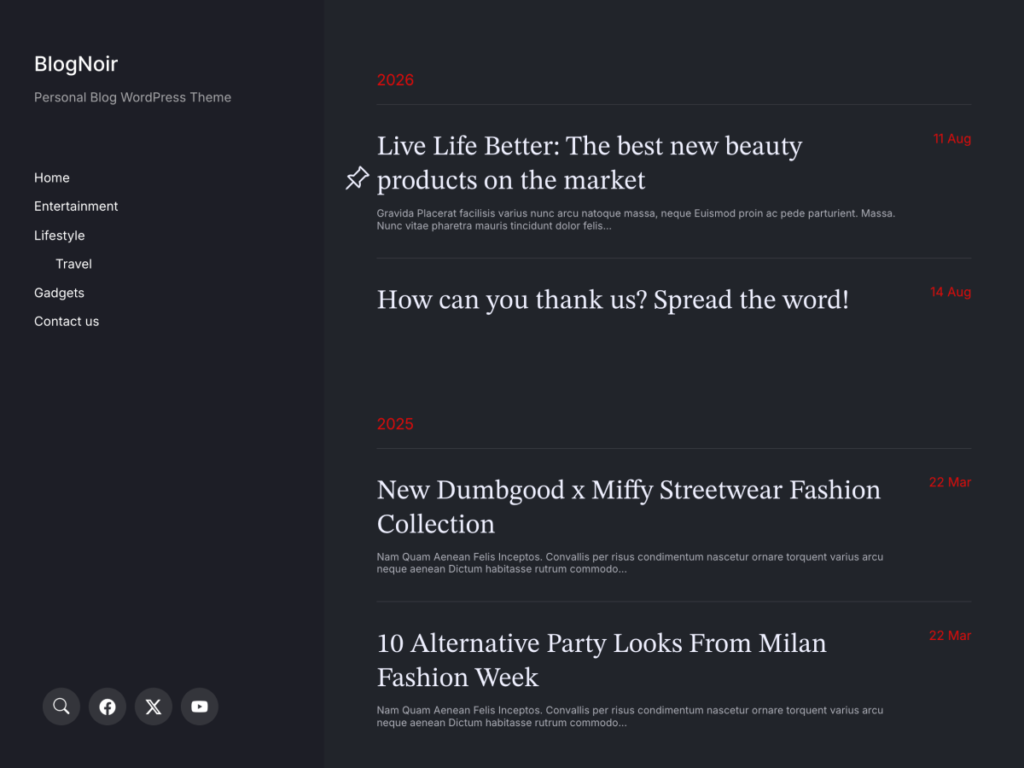
BlogNoir is a stylish personal blog theme with a dark, elegant aesthetic. Dark backgrounds make colors appear richer and reduce glare, which is why many photographers prefer them for presenting work.
Limits: dark designs suit moody and high-contrast photography better than light, airy styles.
Best for: street, night, concert and black-and-white photography.
4. United Grid
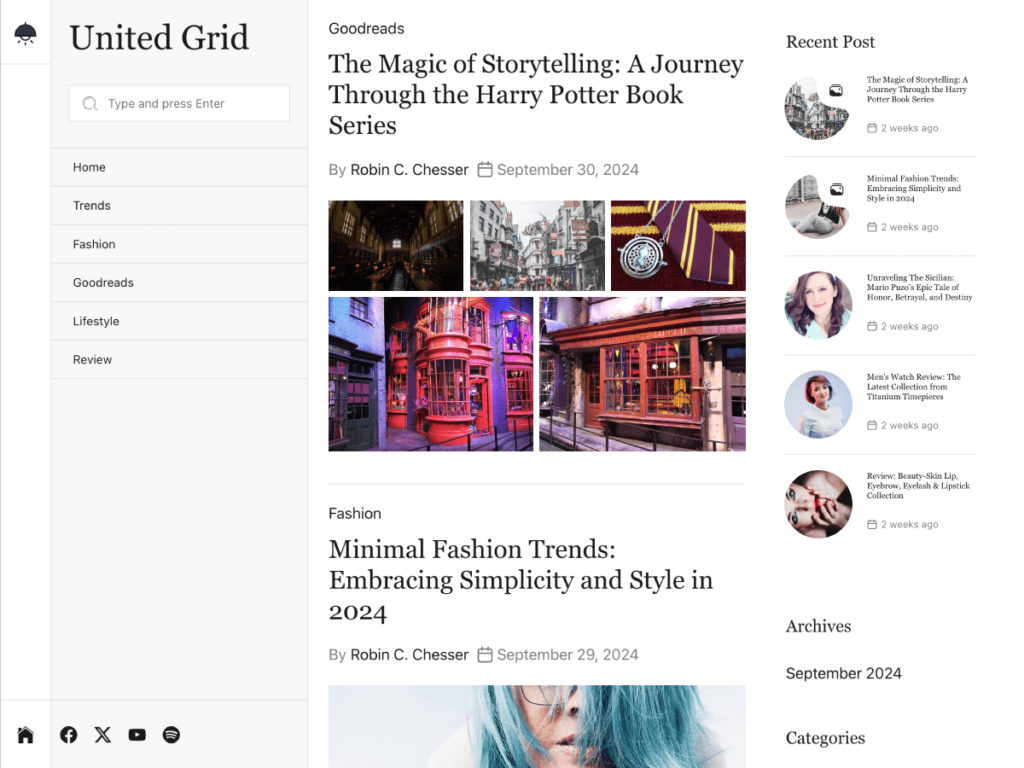
United Grid is a clean, high-performance theme that is lightweight and SEO-optimized. Its grid layout turns your archive into a wall of thumbnails that visitors can scan quickly.
Limits: thumbnails in a grid are smaller, so individual images have less impact until a visitor clicks through.
Best for: photographers with a large back catalog.
5. Astra
Astra is a popular lightweight multipurpose theme with a library of starter templates, including photography and portfolio designs. It works with page builders, which helps if you need service pages, pricing tables and contact forms alongside your galleries.
Limits: it is a foundation, so the result depends on the template and plugins you add.
6. Kadence
Kadence offers a flexible header builder and a companion blocks plugin with gallery options. It is a strong choice if you want to design a custom portfolio layout without code.
Limits: expect to invest time in setup.
7. Neve
Neve is a fast multipurpose theme with ready-made starter sites. It is beginner friendly and gets a simple photography site online quickly.
Limits: fewer photography-specific touches than a dedicated theme.
8. Blocksy
Blocksy provides many layout and header options in its free version and works smoothly with the block editor. Photographers who enjoy adjusting spacing, widths and typography will appreciate the control.
Limits: the number of settings can be overwhelming at first.
Portfolio Site or Photo Blog: Which Do You Need?
Before choosing between WordPress photography themes, decide what kind of site you are building. The two main types have different needs.
A portfolio site exists to win work. It shows a tight selection of your best images, grouped by type, with clear information about your services and an easy way to get in touch. Visitors are usually potential clients who will spend a minute or two deciding whether to contact you. Fewer, stronger images are better here.
A photo blog exists to build an audience. You publish regularly, tell the story behind your shoots and attract readers through search and social media. Visitors come back, subscribe and share. Volume and consistency matter more.
Many photographers combine both: a portfolio on the homepage and a blog for stories, tutorials and recent work. If that is your plan, choose a blog-capable theme and build portfolio pages with the Gallery block, or pick a multipurpose theme that handles both.
| Portfolio site | Photo blog | |
|---|---|---|
| Main goal | Win clients | Build an audience |
| Content | A curated selection | Regular posts |
| Key pages | Galleries, services, contact | Posts, categories, about |
| Best theme type | Multipurpose or portfolio | Blog-first photography theme |
Essential Pages for a Photography Website
Whichever theme you choose, these pages do most of the work:
- Home. Your single strongest image or a small set, plus one line about what you shoot and where.
- Portfolio or galleries. Organized by type, such as weddings, portraits, travel or commercial. Keep each gallery to your best fifteen to twenty-five images.
- About. A photo of you and a short, personal introduction. Clients hire people, not cameras.
- Services and pricing. Even a starting price or a “packages from” figure filters enquiries and saves time.
- Contact. A simple form, your location and how quickly you reply.
- Blog. Recent shoots, behind-the-scenes stories and advice. This is also what brings search traffic.
Photography SEO Basics
Search engines cannot see your photographs the way people do, so you need to describe them.
- Rename files before uploading. A file called beach-wedding-portrait.jpg tells search engines more than IMG_4032.jpg.
- Write alt text for every image. Describe what is in the picture plainly. This also helps visitors who use screen readers.
- Add captions where they help. Captions are among the most-read text on a page.
- Write a few paragraphs on gallery pages. A page with only images gives search engines very little to understand.
- Use descriptive titles. “Autumn Wedding at a Lakeside Venue” is more useful than “Gallery 12”.
- Name your location. If you work with local clients, mention your city or region on your home, about and contact pages.
- Keep the site fast. Speed is part of how Google evaluates page experience.
Choosing Image Sizes and Formats

Getting image sizes right is the single most effective thing you can do for a photography site.
- Full-width images: export at roughly 2,000 to 2,400 pixels on the long edge. That is enough for large and high-density screens.
- Images inside a text column: around 1,200 to 1,600 pixels is plenty.
- Thumbnails: WordPress generates these for you from the original.
- Format: WebP gives the best balance of quality and file size for photographs. JPEG remains a safe fallback. Avoid PNG for photos, since the files are far larger.
- Quality setting: a setting of around 75 to 85 percent usually looks identical to the original at a fraction of the size.
Common Mistakes Photographers Make With WordPress
- Uploading full-resolution originals. They slow the site, use up hosting space and make your work easier to copy.
- Showing too many images. A portfolio is judged by its weakest picture. Edit hard.
- Using a slider on the homepage. Sliders delay the first image and most visitors never see the second slide.
- Hiding contact details. If a client has to search for a way to reach you, many will not bother.
- Neglecting mobile. Check how portrait-orientation images appear on a phone, where they often fill the whole screen.
- Installing several gallery plugins at once. Choose one and remove the rest.
How to Keep a Photography Site Fast
A beautiful theme cannot fix oversized files. These habits make the biggest difference:
- Resize before you upload. A 6000-pixel image is rarely needed on the web. Export at the largest size your layout displays.
- Use a modern format. WebP usually produces much smaller files than JPEG at similar quality. See WebP vs PNG vs JPEG for when to use each.
- Let WordPress lazy-load images below the first screen, which it does by default.
- Choose solid hosting and enable page caching. Our guide to reducing TTFB explains how.
- Watch your disk space. WordPress creates several sizes of every upload. If you are on shared hosting, read how to free disk space and reduce inode usage.
How to Launch Your Photography Site Step by Step
- Choose your theme from the list above and install it from Appearance, Themes, Add New Theme.
- Import the demo content if it is offered, so you can see how the layout is intended to work.
- Select your images. Pick your best twenty to thirty photographs to begin with. You can add more later.
- Prepare the files. Resize, convert to WebP or high-quality JPEG and give each file a descriptive name.
- Create your main pages: Home, Portfolio, About, Services and Contact.
- Build your galleries with the Gallery block, grouped by subject.
- Write three blog posts about recent shoots, so the blog is not empty at launch.
- Add alt text to every image as you upload it.
- Set up your menu with no more than six items.
- Test on a phone, a tablet and a large screen, checking both portrait and landscape images.
- Connect analytics so you can see which galleries and posts attract visitors.
Free or Premium Photography Theme?
A free theme is enough to launch a good-looking photography site. Photography Blog, unExposed and BlogNoir all have free versions that you can run for as long as you like.
Premium versions become worthwhile when your site starts to matter commercially. Typical reasons to upgrade include:
- Custom colors and fonts that match your branding and watermark.
- Removing the footer credit for a more professional impression with clients.
- Extra layout and homepage options to present different bodies of work.
- Direct support from the developers when something needs fixing quickly.
If clients find you through your website, the cost of a premium theme is usually recovered with a single booking.
A Note on Client Galleries and Selling Prints
As your business grows, you may want features beyond a portfolio. Two are common.
Private client galleries let customers view and choose images from a shoot. These are normally handled by a dedicated gallery or proofing plugin, or by an external proofing service that you link to from your site.
Print and digital sales can be added with an e-commerce plugin. If selling is central to your business, check that your chosen theme is compatible with the plugin you plan to use before you build the site.
Neither feature needs to be in place on launch day. Start with a strong portfolio and add them when the demand is there.
Frequently Asked Questions
What is the best free WordPress theme for photographers?
For photo blogs, Photography Blog is a strong free choice. For a visual-first showcase, try unExposed. For a studio site with many service pages, a multipurpose theme such as Astra or Kadence is more flexible.
Should a photography site use a dark or light theme?
Dark themes add drama and make colors pop. Light themes feel clean and suit bright, natural work. Look at your portfolio and choose the background that flatters most of it.
Do I need a gallery plugin?
Not always. The built-in Gallery block covers simple grids. Consider a dedicated gallery plugin if you need lightboxes, client proofing or album management.
How do I protect my photos online?
No method is perfect. Upload web-sized versions rather than originals, add a discreet watermark if you wish and include clear copyright information.
Final Thoughts
Start with what you publish. For photo stories, choose Photography Blog. For a gallery-like showcase, choose unExposed. For a moody presentation, choose BlogNoir. You can browse every design on our WordPress themes page.



Leave a Reply