
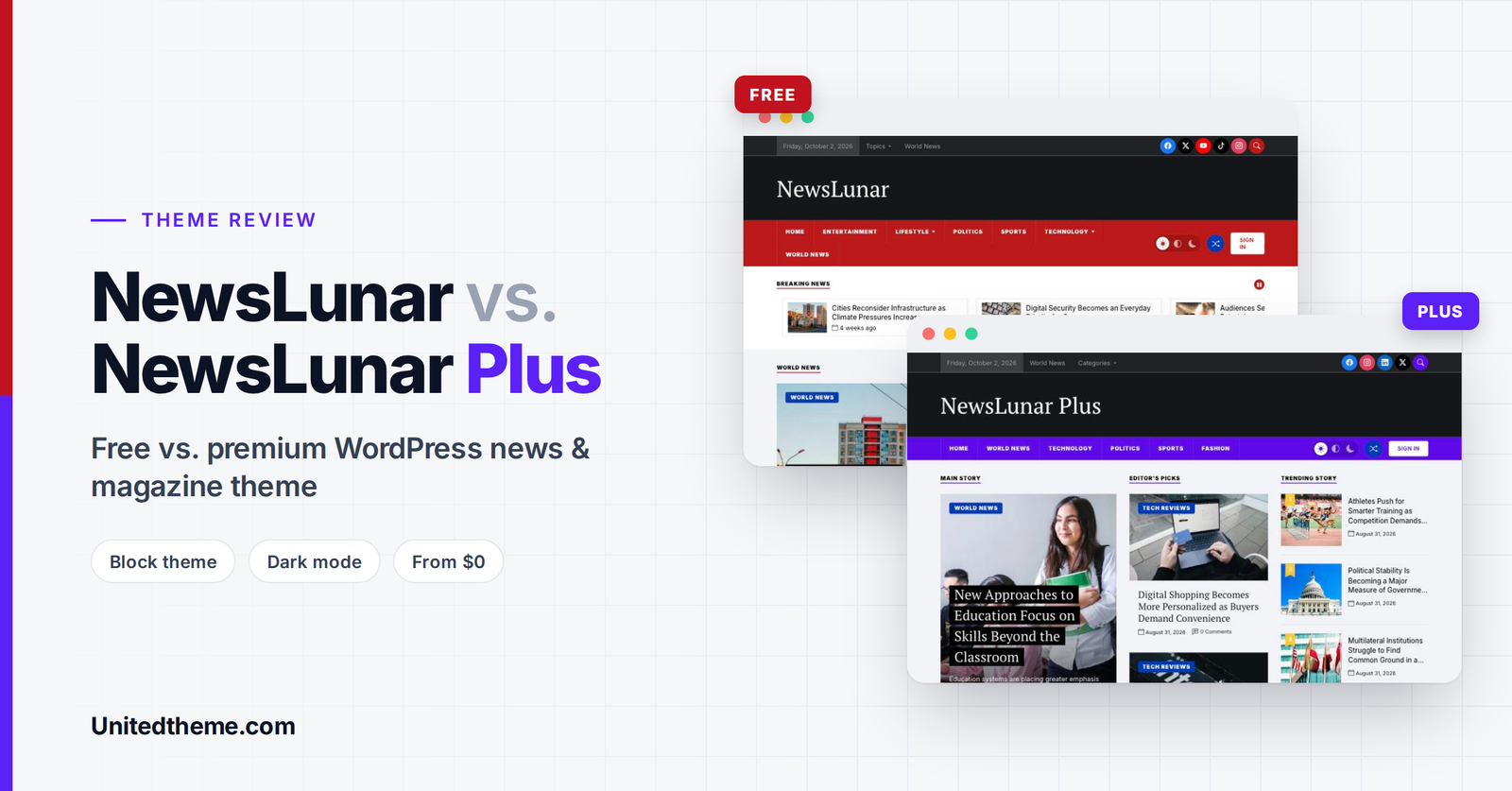
Running a news website is demanding. You publish often, cover many categories, and need readers to find the latest, most important and most popular stories in seconds. Your theme has to do a lot of heavy lifting: organize dozens of posts on the homepage, load quickly on phones, stay easy to update, and still look professional.
NewsLunar is a WordPress news and magazine theme built for exactly that job. It comes in two versions: a free theme available on WordPress.org, and a premium upgrade called NewsLunar Plus with extra customization options, extra features, and dedicated support.
In this review, we’ll walk through what each version offers, how the design works in practice, what you get when you upgrade, and who each version is best for.
Disclosure: NewsLunar and NewsLunar Plus are made by Unitedtheme, the publisher of this blog. We’ve aimed to describe both versions accurately, including their limitations, so you can decide which one fits your site.
In this review:
- NewsLunar at a glance
- Design and homepage layout
- Key features of the free version
- What NewsLunar Plus adds
- Free vs. Plus comparison table
- Pricing and licensing explained
- Performance, SEO and customization
- Pros and cons
- Who should use which version
- How to get started
NewsLunar at a Glance
| NewsLunar (Free) | NewsLunar Plus (Premium) | |
|---|---|---|
| Type | Block theme (Site Editor) | Block theme (Site Editor) |
| Price | Free | From $59 |
| Where to get it | WordPress.org | Unitedtheme.com |
| Current version | 1.0.0 | 1.0.0 |
| Listed WordPress requirement | 5.0 or higher | 5.0 or higher |
| One-click demo import | ✅ | ✅ |
| Support | Community support | Dedicated customer support |
| Live demo | View NewsLunar demo | View NewsLunar Plus demo |
What Is NewsLunar?
NewsLunar is a modern, responsive, and SEO-friendly WordPress magazine and news theme. It’s designed for news portals, online magazines, newspapers, editorial sites, multi-category blogs and content publishers. Whether you cover breaking news, technology, business, sports, entertainment, politics, health, travel, fashion, or finance, the layout is built to display large volumes of content in a clean, organized way.
Unlike older news themes that rely on heavy page builders, NewsLunar is a block theme built for the WordPress Site Editor. That means you edit your header, footer, homepage, templates, colors, and typography visually, right inside WordPress, with no extra page builder plugin required.
Design and Homepage Layout
The first thing you notice in the NewsLunar demo is that it looks like a news site. The layout follows the familiar conventions readers expect from major publications, which makes content easy to scan.
The Header
The header is one of NewsLunar’s strongest areas. It’s built in layers:
- A top bar showing today’s date, quick links, and a topics dropdown, plus social media icons and a search button on the right.
- A bold masthead with your site title or logo.
- A full-width colored navigation bar with dropdown menu support. The free demo uses a strong red; the Plus demo uses a vivid purple.
- A light / auto / dark mode switcher, so readers can choose the reading mode they prefer.
- A random post (shuffle) button that takes readers to a random article, a nice touch for encouraging browsing.
- A “Sign In” button for sites with registered readers.
Homepage Sections
The free NewsLunar demo homepage includes:
- Breaking News: a horizontal news carousel with thumbnails and a pause button, right below the navigation.
- Main story / World News: a large featured story with a bold headline overlay.
- Editor’s Picks: a column of hand-picked stories.
- Trending Story: a numbered list of trending posts with thumbnails.
- Popular News and Latest Posts sections, with pagination.
- A sidebar with search, recent posts, recent comments, archives, and categories.
- A “To the top” button for long pages.
The NewsLunar Plus demo goes further, with a richer homepage that includes a Main Story, Editor’s Picks, a numbered Trending Story list, category-specific story blocks (such as Entertainment, Lifestyle and Politics), Popular News, a Featured News section with category tabs, a Top Trending list, Latest Posts with pagination and an “In Case You Missed” strip near the footer.
Typography pairs a classic serif for headlines with a clean sans-serif for metadata and navigation. That gives both versions an editorial, newspaper-like feel while keeping small text easy to read on screens.
Try it yourself: The best way to judge a theme is to click around the demos on desktop and mobile. Explore the NewsLunar demo and the NewsLunar Plus demo.
Key Features of the Free NewsLunar Theme
The free version is a fully usable news theme, not a stripped-down trial. Here’s what’s included:
Fully responsive design. The layout adapts to phones, tablets, and desktops. Since most news readers browse on mobile, this matters a lot.
High-speed performance. Unitedtheme builds its themes with conditional asset loading and clean markup, so pages stay lightweight. Fast pages help your Core Web Vitals (LCP, INP, and CLS), which support both user experience and SEO.
SEO optimized. Clean code and a proper heading structure help search engines understand your content.
Translation ready (PO, WPML, RTL). You can translate the theme into your language, build multilingual sites with WPML, and publish in right-to-left languages such as Arabic, Hebrew, or Urdu.
Site Editor ready. Edit templates, the header, footer, and homepage layout visually in Appearance → Editor.
One-click demo import. Import the demo content to get a complete, ready-made news site in minutes, then replace the sample posts with your own.
Community support. Get help through the community support channels for the free version.
For a free theme, that’s a solid foundation for a new news blog, a local news site, or a personal magazine project.
What NewsLunar Plus Adds
NewsLunar Plus keeps everything from the free version and unlocks the features growing publishers usually need:
Unrestricted features. All theme features are unlocked, with no limitations.
Font and color options. Customize typography and colors to match your brand. This is one of the most important upgrades: per the official comparison, font and color options are listed as Plus-only. If brand consistency matters to you, it’s a key reason to upgrade.
Newsletter option. Add a newsletter section to grow your email list, one of the most valuable assets any publisher can own.
Instagram feature. Showcase your Instagram content on your site to connect your social audience with your website.
Remove footer credit. The free version shows a “Theme by Unitedtheme” credit in the footer. Plus lets you remove it for a fully white-label, professional look. (In the Plus demo, the footer shows only the site name.)
Dedicated customer support. Get one-on-one help from the team that built the theme through Unitedtheme’s ticket system.
NewsLunar vs. NewsLunar Plus: Feature Comparison
| Feature | NewsLunar (Free) | NewsLunar Plus |
|---|---|---|
| Fully responsive | ✅ | ✅ |
| High-speed performance | ✅ | ✅ |
| SEO optimized | ✅ | ✅ |
| Translation ready (PO, WPML, RTL) | ✅ | ✅ |
| Site Editor ready (block theme) | ✅ | ✅ |
| One-click demo import | ✅ | ✅ |
| Unrestricted features | ❌ | ✅ |
| Font and color options | ❌ | ✅ |
| Newsletter option | ❌ | ✅ |
| Instagram feature | ❌ | ✅ |
| Remove footer credit | ❌ | ✅ |
| Support | Community | Dedicated customer support |
NewsLunar Plus Pricing and Licensing
The free NewsLunar theme costs nothing and can be downloaded from WordPress.org. NewsLunar Plus is available in three one-time purchase options (prices in USD, as listed at the time of writing):
| Plan | Price | What’s included |
|---|---|---|
| Single Site License | $59 | License key for one website, 1 year of updates, 1 year of support, unlimited domain usage |
| Lifetime Access (recommended) | $99 | Lifetime updates, lifetime support, one-time purchase fee, unlimited domain usage |
| Lifetime Access with Installation | $149 | Theme installation & setup service, lifetime updates, 1 year of support, unlimited domain usage |
A few helpful licensing details from Unitedtheme’s FAQ:
- You keep the theme forever. Even with the Single Site License, you can keep using the theme after the license period ends. The license gives you access to updates and premium support.
- Unlimited domain usage. The license key activates updates on one website, but you can use the theme on unlimited domains.
- Need setup help? The $149 plan includes theme installation and setup, which is ideal if you’re new to WordPress.
Building Multiple Sites? Consider the All Access Membership
If you build websites for clients or run several publications, Unitedtheme also offers an All Access membership: every premium Unitedtheme theme, including future releases, premium support and updates, and a license for unlimited websites. It’s listed at $249 per year, or $399 for lifetime access as a one-time payment.
Which Plan Offers the Best Value?
For most single-site publishers, the $99 Lifetime Access plan is the sweet spot. For $40 more than the single-site license, you get lifetime updates and support, so you never need to renew. If you’re launching your first site and want it done for you, choose the $149 plan. Agencies and freelancers will get more value from the All Access membership.
Performance, SEO and Customization
Built for Speed
News sites often struggle with speed because they display many images and posts on one page. NewsLunar is built as a lightweight block theme with conditional assets (only loading what’s needed) and clean markup. Combined with good hosting, caching, and optimized images, that helps keep your Core Web Vitals in the green.
Tip: Pair NewsLunar with modern image formats like WebP. See our guide: WebP vs. PNG vs. JPEG: The Best Image Format for WordPress.
SEO-Friendly Foundations
NewsLunar provides a clean, semantic structure. For full SEO control (meta titles, descriptions, schema and XML sitemaps), pair it with an SEO plugin such as All in One SEO, Yoast SEO or Rank Math, and connect Google Analytics to track your traffic. Our guide on how to install Google Analytics in WordPress walks you through it.
Customization Without Code
Because NewsLunar is a block theme, most customization happens in the Site Editor (Appearance → Editor):
- Rearrange homepage sections by moving blocks.
- Edit the header and footer template parts.
- Change templates for single posts, archives, and pages.
- In NewsLunar Plus, adjust fonts and colors to match your brand.
No page builder is required, which helps keep the site lighter and reduces plugin dependencies.
Pros and Cons
What We Like
- A professional news layout out of the box. Breaking news, editor’s picks, numbered trending lists, and category blocks make it look like a real publication from day one.
- A thoughtful header. Date bar, social icons, search, dark mode switcher, and random post button are features readers appreciate.
- A modern block theme. Full Site Editor support with no page builder required.
- Light and dark reading modes, which are great for readers who browse at night.
- Translation and RTL support for multilingual and international publishers.
- One-click demo import to get started fast.
- A capable free version that’s useful in its own right.
- Flexible Plus pricing, including a lifetime option and a done-for-you installation plan.
What Could Be Better
- Font and color controls are Plus-only. Free users who want to match their brand colors and typography will need to upgrade.
- Newsletter and Instagram features require Plus, even though these are increasingly standard for publishers.
- It’s a brand-new theme. Both versions are at version 1.0.0, so there isn’t yet a long track record of updates and user reviews.
- Free support is community-based. If you need fast, direct help, you’ll want a Plus license.
Who Should Use NewsLunar (Free)?
The free version is a great fit if you are:
- Launching a new news blog or local news site on a budget.
- Testing a news site idea before investing in premium tools.
- Comfortable with the default design and don’t need custom brand colors or fonts yet.
- Happy with community support.
Who Should Upgrade to NewsLunar Plus?
NewsLunar Plus is the better choice if you:
- Run a professional publication or business news site and want a branded look with custom fonts and colors.
- Want to grow an email list with the built-in newsletter option.
- Want to showcase Instagram content on your site.
- Need a white-label site without the footer credit, for example, for a client.
- Want dedicated support from the theme developers.
- Prefer a lifetime license with no recurring fees.
Our recommendation: Start with the free NewsLunar theme if you’re just testing an idea. If you’re serious about building a branded publication, go straight to NewsLunar Plus with Lifetime Access. It’s the best long-term value and saves you from migrating customizations later.
How to Get Started With NewsLunar
Installing the Free Version
- In your WordPress dashboard, go to Appearance → Themes → Add New Theme.
- Search for “NewsLunar.”
- Click Install, then Activate.
- Import the demo content using the one-click demo import, then start replacing sample posts with your own.
You can also download NewsLunar from WordPress.org and upload it via Appearance → Themes → Add New Theme → Upload Theme.
Installing NewsLunar Plus
- Purchase your preferred license on the NewsLunar Plus page.
- Download the theme
.zipfile from your account. - Go to Appearance → Themes → Add New Theme → Upload Theme, upload the file, and click Install Now, then Activate.
- Enter your license key to receive updates and support.
- Run the one-click demo import and customize your site in Appearance → Editor.
Already using the free version? Upgrading to Plus lets you keep building on the same design, with every Plus feature unlocked.
Need help? Unitedtheme offers theme support via tickets, documentation, and a beginner’s guide.
Frequently Asked Questions
Is NewsLunar really free?
Yes. NewsLunar is a free theme hosted on WordPress.org. You can use it on your website at no cost, with community support.
What’s the main difference between NewsLunar and NewsLunar Plus?
NewsLunar Plus unlocks all features, adds font and color options, a newsletter option, and an Instagram feature, lets you remove the footer credit, and includes dedicated customer support.
Does NewsLunar work with the WordPress Site Editor?
Yes. Both versions are block themes built for the Site Editor, so you can customize templates, layouts, and styles visually without code or a page builder.
Can I use NewsLunar Plus after my license expires?
Yes. According to Unitedtheme, you can use the theme for life, even with a single-site license. The license period covers access to updates and premium support.
Is NewsLunar good for SEO?
NewsLunar uses clean, SEO-friendly markup and focuses on speed, both of which support strong rankings. For the best results, pair it with an SEO plugin, quality content, and good hosting.
Does NewsLunar support multiple languages and RTL?
Yes. Both versions are translation-ready with PO files, WPML compatibility, and RTL support.
Can I get help installing the theme?
Yes. The Lifetime Access with Installation plan ($149) includes theme installation and setup by the Unitedtheme team.
Recommended Video Tutorials
New to block themes and the WordPress Site Editor? These channels publish helpful tutorials:
- WordPress (official channel): official guides to the Site Editor, block themes and templates. youtube.com/@WordPress
- Learn WordPress (official learning resources): free workshops and courses on block themes. learn.wordpress.org
Quick video searches:
- How to use the WordPress Site Editor
- How to install a WordPress theme
- How to build a news website with WordPress
Editor’s tip: If you record a walkthrough of NewsLunar or NewsLunar Plus for your YouTube channel, embed it here by pasting the video URL on its own line in the block editor.
Final Verdict
NewsLunar is a strong free option for anyone starting a news or magazine website. It delivers a professional, newspaper-style layout, a modern Site Editor workflow, dark mode, translation support and fast performance, without costing a cent.
NewsLunar Plus is the natural next step for publishers who want their site to look and feel like their brand. Font and color options, the newsletter and Instagram features, footer credit removal and dedicated support make it well worth the upgrade, especially with the $99 lifetime option.
If you’re ready to launch a modern news site, explore the NewsLunar demo and the NewsLunar Plus demo, then pick the version that fits your goals.
Download NewsLunar Free · Get NewsLunar Plus
Want a Custom News Website Built for You? Let Our WordPress Developers Help
NewsLunar gives you a powerful starting point, but every publication is different. At Unitedtheme, we offer professional WordPress development services to take your news site further: custom homepage layouts and templates, branded designs built on NewsLunar Plus, advertising and subscription integrations, content migration from your old site, and performance tuning for high-traffic news portals. Our developers handle the technical work so your newsroom can focus on publishing great stories. If you want a news website that’s fast, polished, and built around your exact needs, hire Unitedtheme’s expert WordPress developers and launch your publication with confidence.


Leave a Reply